PracticeXP logo PracticeXP
Level up your practice

Know who practiced before you raise the baton.

PracticeXP shows band, orchestra and choir directors who is practicing, who has stopped, and who needs help — without collecting another paper practice log. Students log their time on a phone and earn streaks and badges for consistency.

Bring it to your program See pricing

Or join the Founding 5 — five programs, free through June, set up with me personally.

Built by a band director, not an ed-tech company.

I'm Robby Dzielinski. I teach 5–12 band in Waterloo, Wisconsin.

I built PracticeXP because I was tired of finding out in November that a student had stopped practicing in September. Paper logs told me who remembered to bring a slip. They never told me who needed help.

So I built what I actually wanted: open the dashboard, see who's practicing, see who's fallen off, and catch it while there's still time to do something about it.

It ran in my own program before anyone else used it, which is where the odd details come from. The leaderboard tells students outright that it mostly rewards whoever has more time and a quieter house. The note home about missing practice is written so it doesn't read as an accusation. The practice timer stops itself after four hours instead of recording that someone practised overnight. Everything here is here because a real class needed it.

If you teach band, orchestra or choir, I'm the person who answers your email.

What it looks like

Both of these are the live demo — every student name in them is made up. Open it yourself, no account needed.

Try the director dashboard right here

Loads the real thing on this page — a full dashboard against a fictional class. No account, nothing installed, nothing saved.

Prefer it full-size? Open the demo in its own tab — and the student view is here.
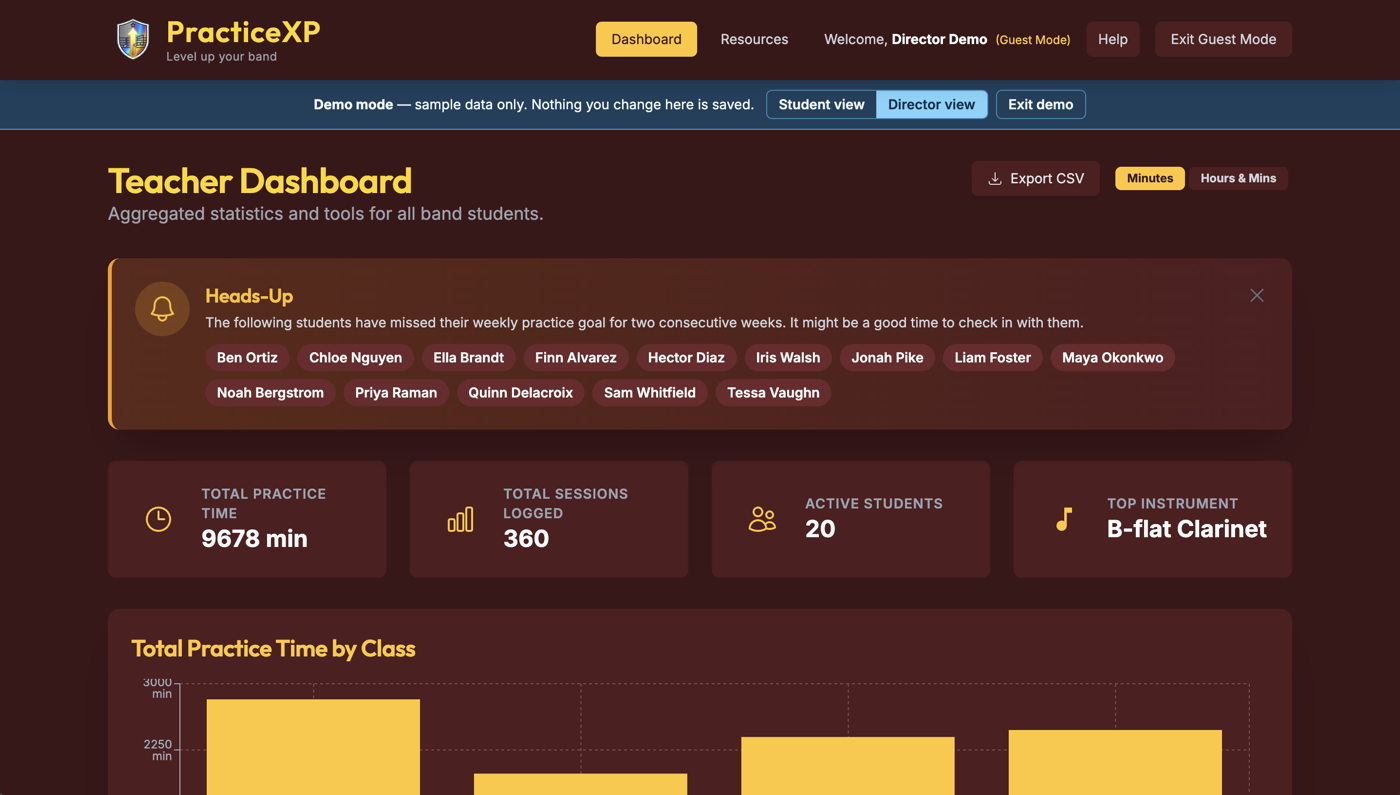
The director dashboard: a heads-up panel naming students who have missed their weekly practice goal two weeks running, above totals for practice time, sessions logged, active students and most-played instrument.
The director's view. Who's on track, who has quietly stopped, and the totals behind it.
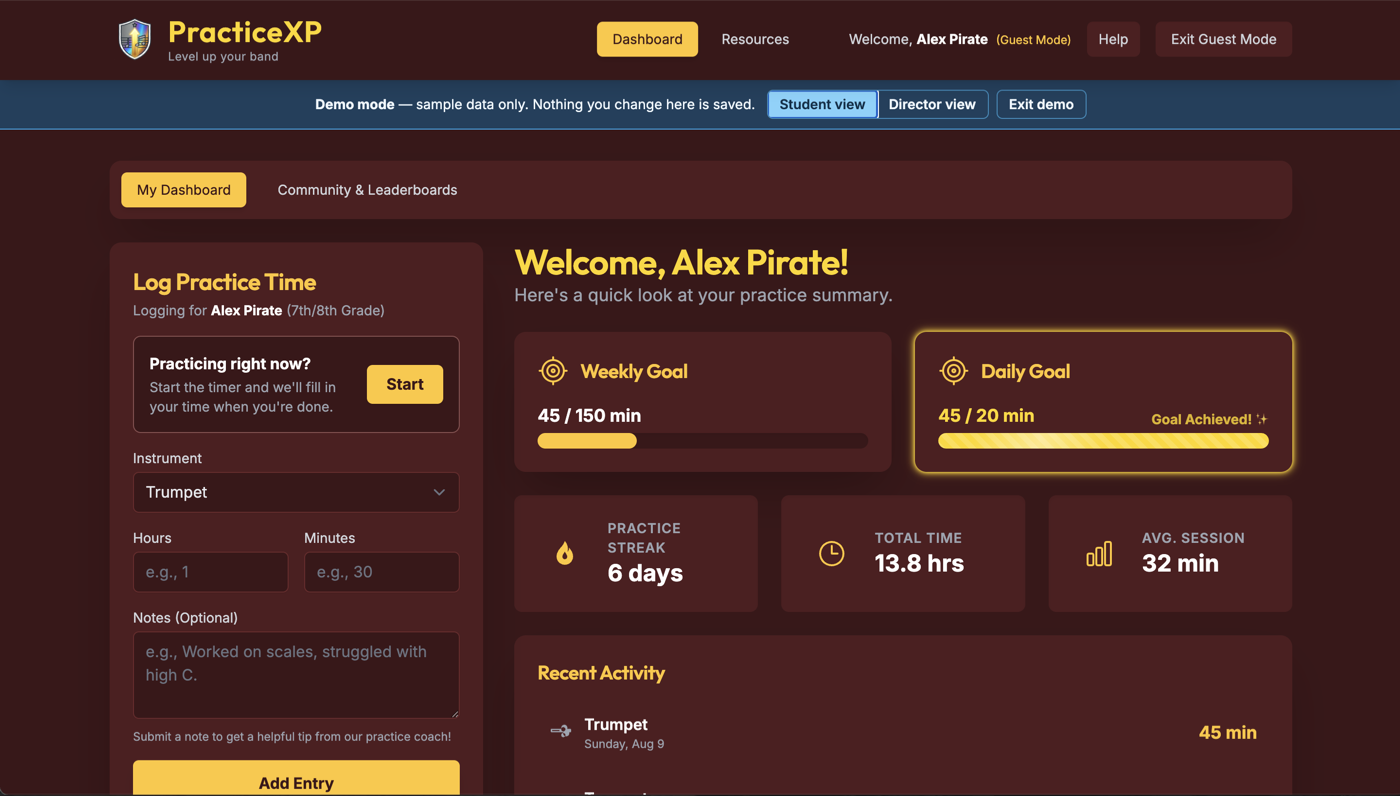
The student dashboard: a six-day practice streak, a daily goal marked achieved, total practice time, and the last three sessions logged.
The student's view. Log a session in about ten seconds, then watch the streak.

What it does

Built for one job: getting students to practice, and giving directors evidence of it.

For the director

A dashboard of your whole program — total practice time, per-grade leaderboards, section totals, and a missed-goals alert showing exactly who has fallen behind this week.

For the student

Log a session in about ten seconds. Streaks, badges, and progress bars against the goal their director set. Practice notes get written coaching feedback.

For parents

A monthly summary of their child's practice — total time, days practiced, and how it compared to the goal. Sent by the director; parents need no account.

Goals that fit how you teach

Set targets per grade level, per section, or per student. Goals drive the progress students see and the alerts you get.

Practice resources

A tuner that shows the note as it's written on the student's part rather than concert pitch, a metronome, fingering charts, and over 160 checked links — including string positions, shifting and bowing, and vocal warm-ups for choir. Plus a scale coach and a music librarian students can ask about pieces, composers and theory.

Try the tuner and metronome — no account needed.

Your data, exportable

Download every practice entry as a CSV any time — for your grade book, an administrator report, or just to keep your own copy.

Pricing

One annual price per program, tiered by size. Students and parents are never charged.

$300
per year
Up to 100 students
$400
per year
Up to 250 students
Larger than 250 students? Get in touch and we'll quote your district. We also invoice against a purchase order if your district requires one — just ask before you check out, and tell us if you need a W-9.

Every feature is on both plans. The plans differ only by program size, never by what you can do.

Student privacy

Your students are minors. We treat their data that way.

How we keep schools separate →  ·  Read the full privacy policy →

Common questions

How do I get my program set up?
Click "Request access for your program" on the sign-in page and tell us your school, your name, and your school email address. We'll confirm the details and put a data privacy agreement in place — including your district's own rider if they have one — then set your school up and email you back. After that you sign up with the same school email, upload your roster from a spreadsheet, and set a practice goal. About ten minutes of your time in total. We provision schools by hand on purpose: your students are minors, and nobody should be able to spin up a container for their data from a web form.
Why this instead of a spreadsheet?
A spreadsheet works. Plenty of good directors run on one, and if yours is working, keep it — you'll know when it stops. Two things change when the log lives here instead: the students enter it, not you, and the app tells you who has fallen off instead of you scanning rows to find out. Goals, missed-goal alerts, and the monthly note home to parents build themselves. If your program is small enough that none of that is costing you an evening, a spreadsheet is genuinely the right answer.
We already pay for a music program management system. Should we switch?
Probably not, and we'd rather say so. PracticeXP does one thing — practice time. No inventory, no trips, no uniforms, no fundraising. If the practice-log piece of what you have isn't getting used, this is cheap enough to run alongside it without moving your program. It is not worth a migration.
How is this different from a practice app?
Most practice apps are built for the player — metronome, tuner, recorder. Those are for practising. This is for tracking whether it happened, and it's built around what the director needs to see. Different job; plenty of students use both.
Can I look at it before I commit?
Yes. The sign-in page has a Try as a Director demo — the full dashboard against a fictional class, no account and no card needed. There's a student demo too, so you can see both sides of what you'd be asking your students to do.
How do students get accounts?
Two ways. Either any student with an email address on your school's domain can sign up, or — recommended — you load a roster first and a student's signup has to match a row you created, so nobody can invent their own grade or instrument. Loading the roster means downloading a spreadsheet template already set up for your school, filling it in, and uploading it back. Pasting cells straight out of Sheets or Excel works too.
Our district doesn't allow AI. Is this usable?
Yes, and you don't have to do anything — every AI feature is off when we set your school up, and nothing is sent to any AI service unless a director switches something on. Practice logging, the timer, goals, streaks, leaderboards, fingering charts, the resource library, reports, CSV export and the monthly parent summaries have never used AI. That's most of the product. If your district needs it off permanently, so a future director can't enable it, we lock it at our end and write that into your agreement. If you do want some of it, you choose feature by feature — and for the two that send something a student wrote, class by class as well.
Another school signs up. Can they see my students?
No — not their names, not their totals, not that they exist. Each school is a separate tenant. A user's school is decided by our server when their account is created and written into their sign-in token, then checked on every database read and write; the app never asks the browser which school someone belongs to. Searches also have to declare their school up front or the database refuses them outright, which is where this kind of system usually leaks. Full detail here, including what we don't claim.
Do parents need accounts?
No. Parents have no login. If a director has a parent's email on the roster, they can send a monthly practice summary; that's the only contact.
Can it verify a student actually practiced?
No, and we don't claim it can. Students self-report. Treat the numbers as a log of what students say they did — useful for building the habit and for conversations, not as proof.
What happens to our data if we stop using it?
Export it any time with the CSV button. After a contract ends we keep data no longer than 30 days so you can complete an export, then delete it. Earlier deletion on request, any time.
Who is behind PracticeXP?
Robby Dzielinski, a working 5–12 band director in Waterloo, Wisconsin, who built it for his own program before anyone else used it. There is more about that at the top of this page. He is also the person who answers support email — there is no tier above him.

Get in touch

Questions, a demo, a quote for a large program, or district paperwork.

support@practicexp.com

PracticeXP · 421 N Elizabeth Ave, Apt 1, Jefferson, WI 53549 · United States